🔒 การควบคุมการเข้าถึง
หลักการทำงาน
ระบบควบคุมการเข้าถึงมี 3 เลเยอร์:
┌─────────────────────────────────────┐
│ 1. Filesystem Permissions (Linux)   │ GID: 1008-1013 │
├─────────────────────────────────────┤
│ 2. Nextcloud Group Folders          │ Read-Only      │
├─────────────────────────────────────┤
│ 3. Nginx + Cloudflare               │ HTTPS only     │
└─────────────────────────────────────┘
Layer 1: Filesystem Permissions
| Directory | Owner | Group | Mode | ACL |
|---|---|---|---|---|
/data/Company/ | root | nas_admin | 2775 | other:r-x |
00_Admin/ | root | nas_admin(1008) | 2775 | other:r-x |
01_Accounting/ | root | nas_accounting(1009) | 2775 | other:r-x |
02_Marketing/ | root | nas_marketing(1010) | 2775 | other:r-x |
03_Video/ | root | nas_video(1011) | 2775 | other:r-x |
04_AI_QCCAP/ | root | nas_ai(1012) | 2775 | other:r-x |
05_Staff/ | root | nas_staff(1013) | 2775 | other:r-x |
90_Archive/ | root | nas_admin(1008) | 2775 | other:r-x |
99_Backup_Drop/ | root | nas_staff(1013) | 3770 | ACL: nas_admin+ |
คำสั่ง ACL
bash
# ดู ACL ของโฟลเดอร์
getfacl /data/Company/01_Accounting

# เพิ่มสิทธิ์ read สำหรับทุกคน (other)
sudo setfacl -m o::rX /data/Company/01_Accounting

# เพิ่มสิทธิ์ read สำหรับ group เฉพาะ
sudo setfacl -m g:nas_admin:rX /data/Company/99_Backup_Drop
Layer 2: Nextcloud Group Folders
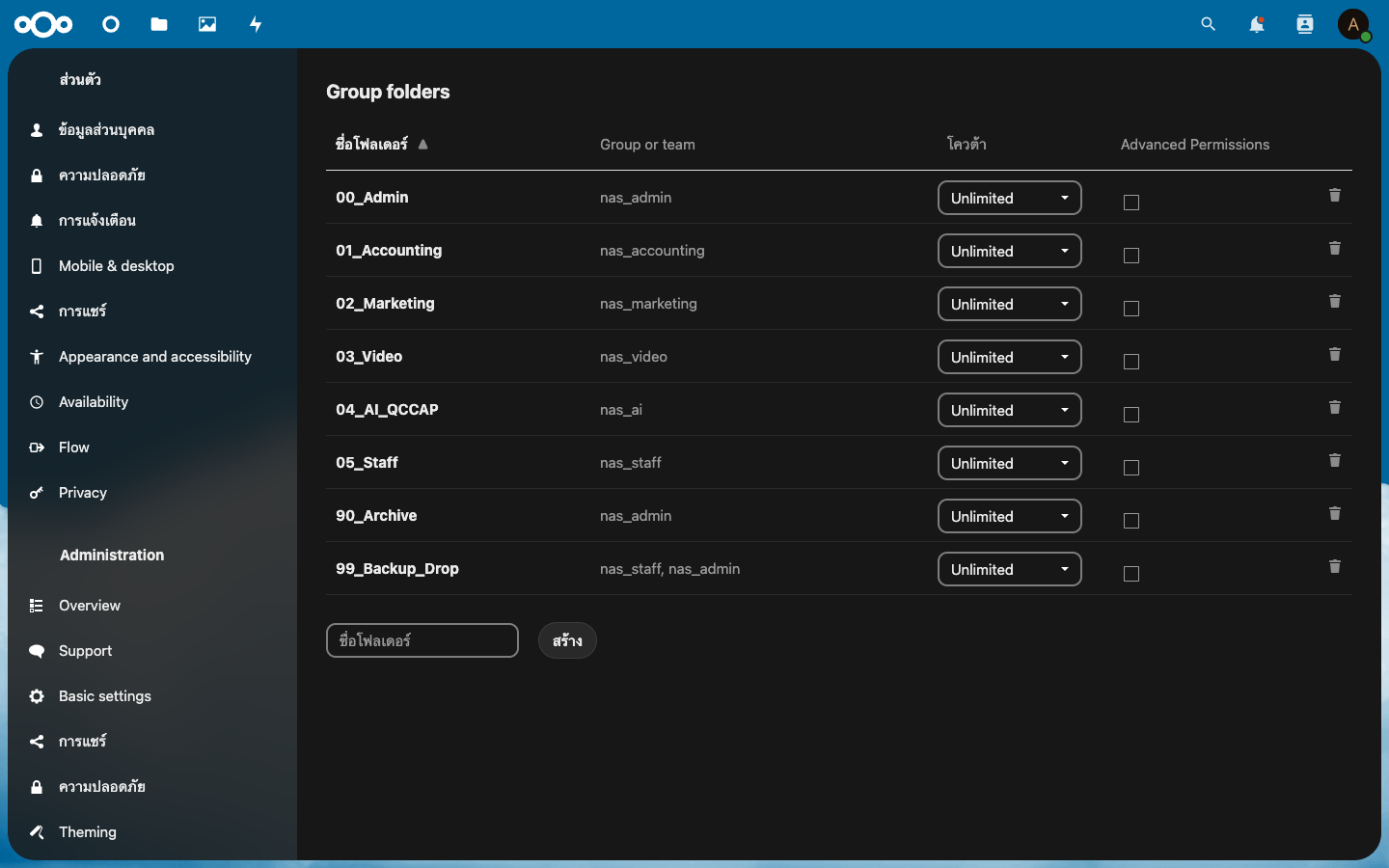
การเข้าถึงถูกควบคุมผ่าน Group Folders App:
bash
# สร้าง Group Folder
sudo -u ccdev docker exec -u www-data nextcloud-app \
  php occ groupfolders:create "01_Accounting"

# กำหนดสิทธิ์ให้กลุ่ม (ID=2, Read-Only)
sudo -u ccdev docker exec -u www-data nextcloud-app \
  php occ groupfolders:group 2 nas_accounting

# ดู Group Folders ทั้งหมด
sudo -u ccdev docker exec -u www-data nextcloud-app \
  php occ groupfolders:list
Permissions Matrix
| Folder ID | Folder Name | Groups | Access |
|---|---|---|---|
| 1 | 00_Admin | nas_admin | Read |
| 2 | 01_Accounting | nas_accounting | Read |
| 3 | 02_Marketing | nas_marketing | Read |
| 4 | 03_Video | nas_video | Read |
| 5 | 04_AI_QCCAP | nas_ai | Read |
| 6 | 05_Staff | nas_staff | Read |
| 7 | 90_Archive | nas_admin | Read |
| 8 | 99_Backup_Drop | nas_staff, nas_admin | Read |
Layer 3: Network Security
Cloudflare
- SSL/TLS encryption (Flexible mode)
- DDoS protection
- IP masking
Nginx
- HTTP → 301 redirect to HTTPS (for direct access)
X-Forwarded-Proto: httpsheader passthrough- Client max body size: 10 GB
- Timeout: 300s
UFW Firewall
bash
sudo ufw status | grep -E '80|443'
# 80/tcp    ALLOW  Anywhere
# 443/tcp   ALLOW  Anywhere
การรักษาความปลอดภัยเพิ่มเติม (แนะนำ)
- 2FA: ติดตั้ง Two-Factor Authentication app
- IP Restriction: จำกัด IP ที่เข้าถึง Admin panel
- Audit Log: เปิดใช้งาน logging
bash
# ติดตั้ง 2FA
sudo -u ccdev docker exec -u www-data nextcloud-app \
  php occ app:install twofactor_totp